


Shopify's app store has more than 13,000 apps in it, which is both the reason the platform can do almost anything and the reason so many stores end up slow, buggy and quietly overspending. Every app you install adds code, competes for the same parts of your theme, and bills you monthly whether you use it or not. Left unchecked, the app stack becomes a cost centre that rivals a real line on the P&L.
We've built over 500 Shopify stores and developed custom apps for brands whose needs ran past what anything off the shelf could do. This is the list we actually give clients: the apps that earn their place, with the pricing as it stands in 2026 and a note on where each one is the right call and where it isn't. It's a reference, not a ranking. The best stack is the smallest one that does what your store needs.
A note on pricing: app pricing changes constantly, and several of these tools have shifted their plans in the last year. Everything below was checked in mid-2026, but always confirm the live figure before you commit, particularly on the usage-based and transaction-fee models, where the headline price is rarely the whole bill.
Click the chapter heading in the list below to take you directly to the relevant section of the article.
1: How to Choose the Right Shopify Apps
3: Site Search and Product Discovery
6: Subscriptions and Recurring Revenue
14: Apps to Avoid: Common Mistakes
15: How Many Apps Should Your Store Have?
1: How to Choose the Right Shopify Apps
Before any specific recommendation, here's what actually matters when you're weighing one up.
Performance Impact
Every app adds code, and some load heavy JavaScript that drags page speed down measurably. Check whether the app supports lazy loading, and test your site speed before and after installing with Google PageSpeed Insights. If an app adds more than 100ms to load time, the value has to be worth the cost. Speed is a ranking and conversion factor in its own right, and our guide to improving Core Web Vitals on Shopify goes deeper on where the time actually goes.
Reviews, Read Properly
Look past the star rating and read the recent reviews, not the top ones. The complaints worth taking seriously are about support response, billing surprises and updates that broke something.
Support Quality
Something will go wrong, and when it does, responsive support is worth more than a feature list. Favour apps with live chat or a fast email turnaround.
Pricing Transparency
Watch for low headline prices with aggressive upsells, usage-based billing that scales unpredictably, transaction fees stacked on top of the monthly fee, or core features locked behind a higher tier than the one you're quoted.
Check Native First
Shopify has spent years absorbing common app features into the core platform. Before you add anything, check whether Shopify now does it natively. Native is usually lighter, more reliable and better integrated, and it's free.
2: SEO
Organic search is still the most efficient traffic a Shopify store gets. It compounds long after the work is done, which is more than paid can say the moment the card stops. Shopify covers the floor on its own: automatic sitemaps, clean URLs, editable meta titles and descriptions. The apps here do at scale what you can't sensibly do by hand across thousands of SKUs, and increasingly they handle the part of search that's changed most.
That change is worth stating plainly, because it reframes the whole category. Search is no longer just Google. Shoppers ask ChatGPT, Gemini and Google's AI Mode for the best option in a category, and the brands that surface in those answers are the ones whose product data is structured, complete and machine-readable. An SEO app in 2026 earns its place as much by how it handles structured data and AI discovery as by how it writes a meta tag. We've covered how to optimise your Shopify store for AI search separately.
One rule before you install anything here: most stores need two or three of these, not six. They overlap heavily, and stacking them duplicates code and slows the site, which is itself a ranking problem. Pick one core optimiser, add a specialist if there's a genuine gap, and stop.
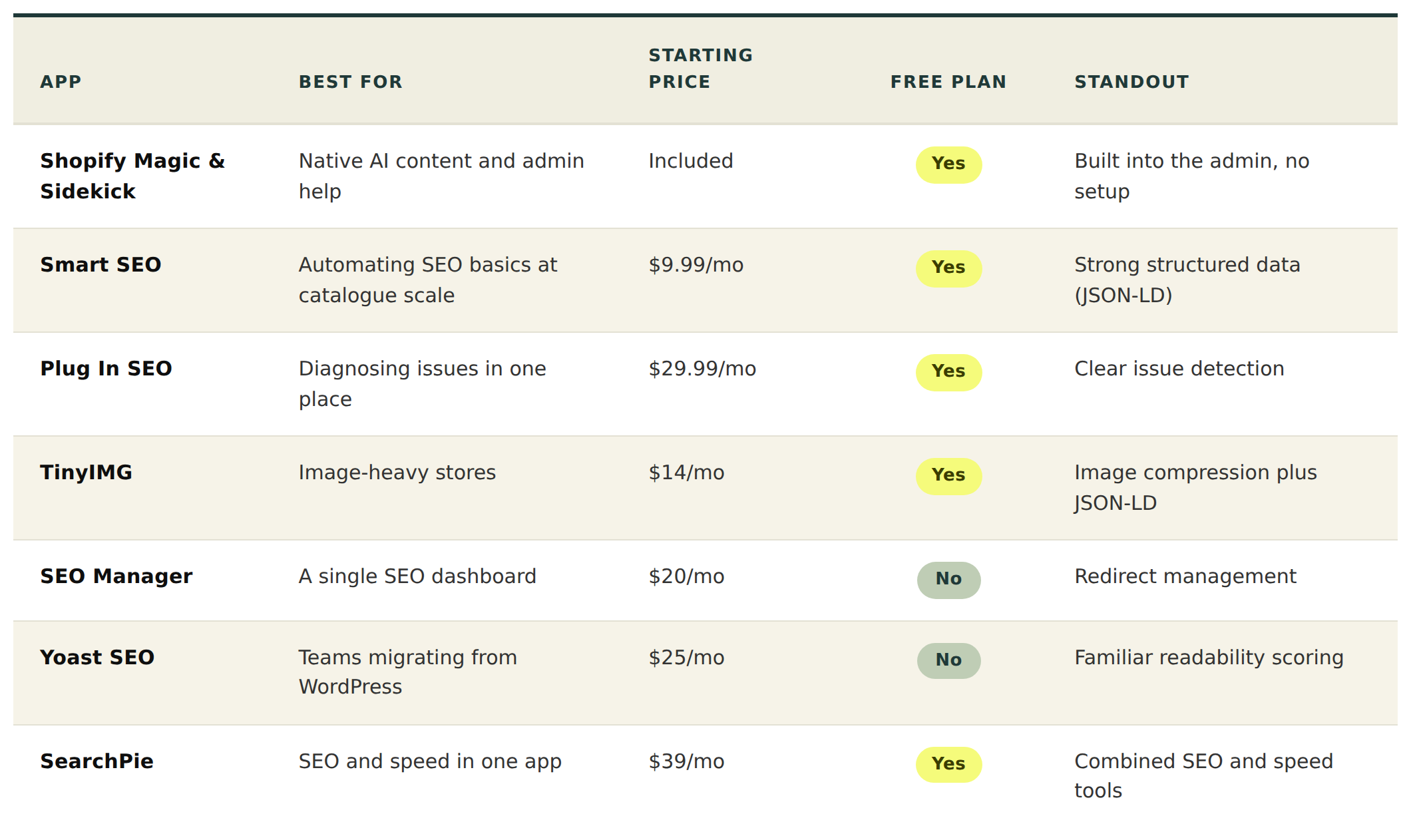
Shopify Magic and Sidekick are the native starting point, included on your plan. Magic generates product descriptions, meta content and blog copy inside the admin; Sidekick is the conversational assistant that answers questions and pulls reports. Both save time on the grunt work, and neither replaces a considered strategy. Magic's output needs editing before it earns a place on a page meant to rank, so treat it as a first draft.
Smart SEO (free plan, then Pro $9.99, Business $19.99, Premium $29.99/month) is the one we reach for most when a large catalogue needs the basics handled automatically: meta tags, image alt text and structured data across hundreds or thousands of products. The JSON-LD support is the real value given where search is heading. Template-driven meta tags won't match hand-written ones on your priority pages, so use it as the baseline and write the important pages yourself.
Plug In SEO (free plan, or $29.99/month) is the diagnostic option. It scans for issues across meta tags, headings, alt text, broken links and structured data, and flags the quick wins. The recommendations skew generic and some of what it surfaces you could audit by hand, but for a team without dedicated SEO resource it puts the problems in one place.
TinyIMG sits across SEO and speed, and that overlap is the point. It compresses images without visible quality loss, auto-generates alt text and adds JSON-LD, with higher tiers bundling faster-indexing tools. For stores carrying large image libraries it does more than its price suggests, and consolidating image optimisation and structured data into one subscription beats running three single-purpose apps.
SEO Manager (from $20/month) gives you one dashboard for meta tags, sitemaps, JSON-LD, keyword suggestions and 404 redirect management. The redirect handling is the standout, which matters during migrations or any URL restructure. It can feel like a lot for a beginner, and some of it Shopify now covers natively, so it suits teams that genuinely want everything in one view.
Yoast SEO for Shopify (from $25/month) feels immediately familiar to anyone who ran Yoast on WordPress, with the same readability scoring and on-page guidance. It came to Shopify later than its competitors and a few features still carry their WordPress origins, so the main reason to choose it is workflow familiarity for a team migrating across.
SearchPie (free plan, premium from $39/month) bundles SEO and speed tools together, including image compression. The combined scope appeals to a smaller store wanting one app for both, though it spreads itself across a lot of ground and a dedicated tool in each area will go deeper.
Worth knowing: a fast-growing class of AI-search-specific tools (schema and LLMs.txt generators, ChatGPT and Gemini visibility apps) appeared this year. They're early, and we'd be cautious about adding one before you have data showing it's needed. But that's the direction the category is moving, and where we'd expect the next meaningful gains. If organic growth is a priority, our Shopify SEO service covers technical audits, site architecture and ongoing optimisation across all of this.
3: Site Search and Product Discovery
This is the category most "best apps" lists skip, and it's one of the most consequential for a store of any real size. Shoppers who use your search bar arrive with intent and convert well above the rate of those who browse. The catch is that Shopify's native search was built for small catalogues. Past a few hundred products you hit the ceilings: limited filtering, no semantic understanding, no typo tolerance, no merchandising control. A shopper who searches "blue linen shirt" and gets nothing, or gets your whole shirt collection in no useful order, leaves. At your scale, that's not a rounding error.
These tools fix the moment of highest intent in the entire journey, which is why we'd argue the category deserves attention ahead of half the others on this list. They also tie into the AI-search shift above: the same structured, well-organised product data that powers good on-site search is what makes you legible to AI shopping assistants.
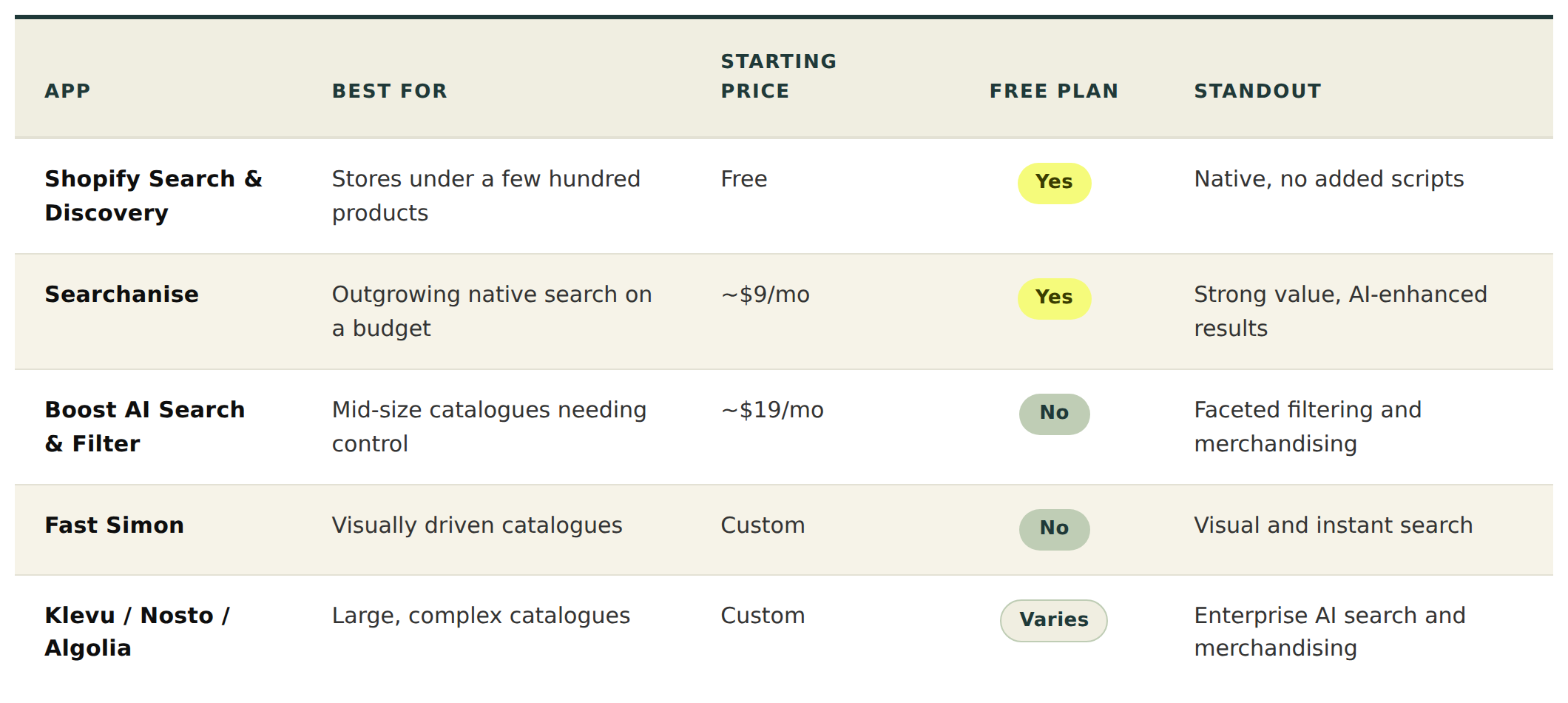
Shopify Search & Discovery (free) is the native baseline and the right first step. It adds autocomplete, filtering and basic recommendations on top of standard search, and for a store under a few hundred products it's genuinely enough. The limits show at scale: a cap on filters, a ceiling on how many products it can filter across, and no semantic search or typo tolerance. Install it, see how far it gets you, and reach for a paid tool only when you feel those limits biting.
Searchanise (free tier, paid from around $9 to $39/month) is the value pick for stores outgrowing native search without an enterprise budget. Fast predictive search, generous filtering, AI-enhanced results and merchandising rules, with a free tier that's a real upgrade over the default. The top tier adds voice search and more control. For most growing stores this is the sensible first paid step.
Boost AI Search & Filter (from around $19/month, scaling with catalogue and traffic) holds the established middle ground. Strong faceted filtering, AI-assisted ranking and solid merchandising controls without the jump to enterprise pricing. A good fit for a sizeable catalogue that wants proper control over how results and collections are ordered.
Fast Simon is built for AI-driven discovery, with particular strength in visual search and instant-search overlays, plus merchandising and cross-sell tools with AI-assisted ranking. Worth a look for visually driven catalogues, fashion, homeware, anything browsed by eye, where helping shoppers discover by image rather than keyword changes the experience.
At the top end, Klevu, Nosto and Algolia are the enterprise options, and the choice comes down to what you're optimising for. Klevu built its reputation on AI search that learns from shopper behaviour over time, with deep merchandising control and support for Shopify Markets and headless builds, which suits large, complex catalogues. Nosto positions itself more broadly as a commerce experience platform, folding search together with personalisation and merchandising rather than offering search alone. Algolia is the developer's choice: extremely fast, highly flexible, usage-based pricing, and the most work to implement. All three sit at the enterprise tier and several are Shopify Plus certified. This is where a store doing serious volume on a large catalogue should be looking, and where the right setup pays back faster than almost any other conversion work.
One caution across the category: search apps inject scripts and can hit load time if poorly configured. Test speed before and after, and use lazy loading where the app supports it. A search tool that fixes discovery but slows the page is a trade you don't want to make blind.
4: Email Marketing
Your email platform tends to become the centre of the marketing stack, so the integrations matter as much as the features. Klaviyo, Omnisend and Mailchimp all connect with the loyalty, review and personalisation tools further down this list, and the value compounds when they work together. Klaviyo plus a loyalty app can trigger VIP campaigns and points reminders automatically; Klaviyo plus a personalisation engine can power upsell emails off real browsing and purchase behaviour. Pick a platform that plays well with the rest of your stack, not just one that looks good in isolation.
Klaviyo (free to 250 contacts, paid from $20/month, scaling with list size) is the gold standard for ecommerce email and SMS, with segmentation, automation and predictive analytics that nothing else in this bracket matches, plus revenue attribution that's accurate down to the flow. The cost is the catch: it climbs steeply as your list grows, and since the 2025 billing change you pay on all active profiles rather than just the ones you email, so large lists cost more than they used to. The interface has a learning curve too. For any serious D2C brand it's still the one to beat, and if you only install one marketing app, make it this. Where most brands leave money on the table is operating it well, not choosing it.
Omnisend (free to 250 contacts, Standard from $16/month, Pro from $59/month) is the value alternative, cheaper than Klaviyo at most list sizes, with automation templates that work out of the box and email and SMS combined in one platform. Segmentation isn't as deep as Klaviyo's and the reporting is good rather than exceptional, but for a growing brand that wants solid automation without the Klaviyo bill, it holds up well.
Shopify Email (free for the first 10,000 emails a month, then $1 per 1,000) is the native option, built into the admin with nothing extra to manage. It's cheap and simple, the automation and segmentation are basic, and it's better for campaigns than for the kind of triggered flows that drive real revenue. The right call for an early-stage brand sending mostly manual campaigns, and a reasonable place to start before you graduate to Klaviyo or Omnisend.
Mailchimp (free to 500 contacts, Essentials from $13/month) has a familiar interface and a strong template builder, and it's good for content-driven newsletters. Its ecommerce automation isn't as sophisticated as Klaviyo's or Omnisend's, both of which were built ecommerce-first, so it suits brands that prioritise newsletters and content alongside their product emails rather than those leaning hard on automated flows.
5: Reviews and Social Proof
Review platforms get more powerful when they're wired into the rest of your marketing. The major ones all integrate with the email tools above, so you can trigger review requests automatically, surface customer photos in campaigns, and tailor messaging to sentiment. A couple of these also bundle loyalty, which reduces your app count if you'd otherwise run the two separately.
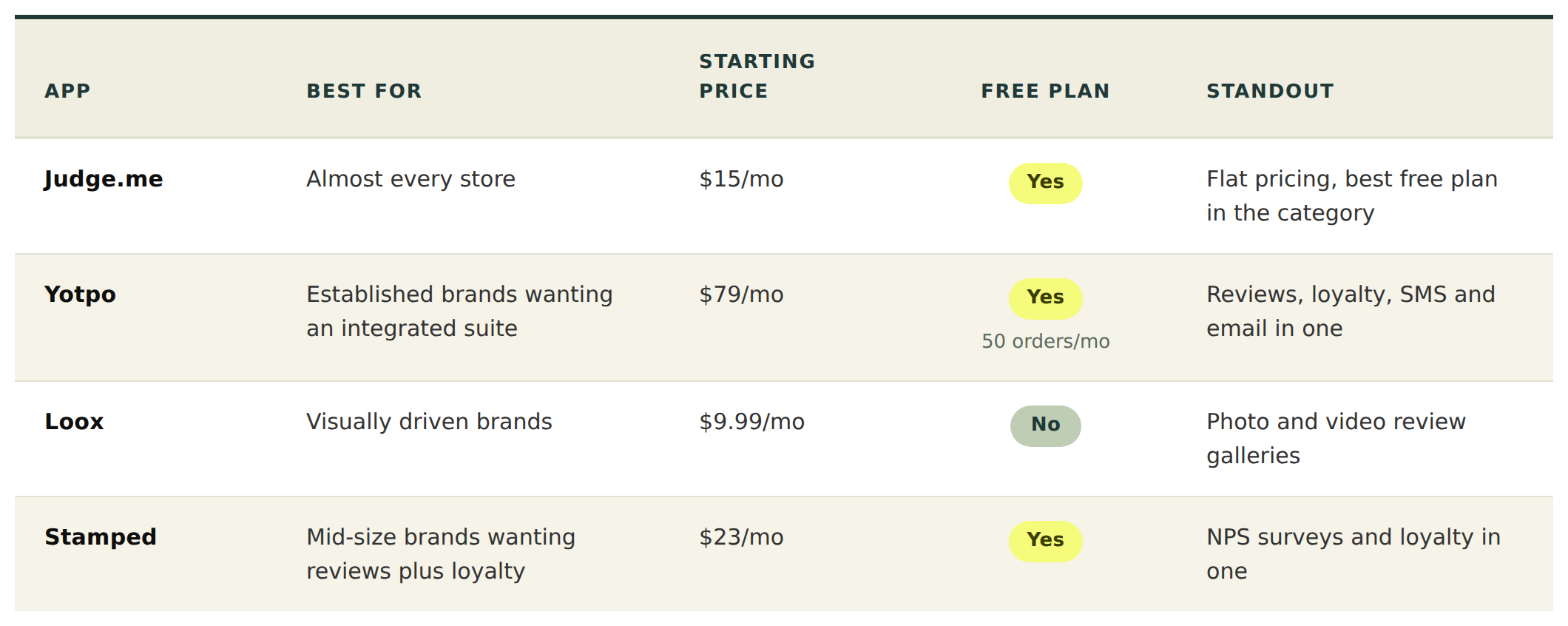
Judge.me (free plan, paid "Awesome" tier a flat $15/month) is the one we install by default. The free plan does more than most paid review apps, with unlimited requests, photo and video reviews, rich snippets and Google Shopping sync, and the paid tier adds Q&A, AI replies and full widget control. The single best detail is the flat pricing: a store doing 100 orders a month and one doing 100,000 pay the same, which is almost unheard of in this category. The design templates aren't as polished as the premium tools until you customise them, and that's about the only reason to look elsewhere.
Yotpo (free to 50 orders/month, Starter from $79/month, Pro around $169) is the enterprise suite, bundling reviews with loyalty, SMS, email and subscriptions on one platform. The reviews module is strong, but the real argument for Yotpo is breadth: for a brand at scale that wants one vendor across customer-touchpoint marketing rather than four stitched-together tools, the bundle pricing makes sense. It's expensive and can be complex to configure, and the free plan is limited, so it earns its place mainly when you'll use more than the reviews.
Loox (Beginner $9.99/month for 100 orders, Scale $34.99, Unlimited $299.99) is the visual choice, built around collecting and displaying photo and video reviews in galleries that look genuinely good on the page. Worth knowing before you sign up: video reviews, the main reason to pick Loox over Judge.me, start at the Scale tier, and pricing scales with order volume from there. For fashion, beauty, home and lifestyle brands leaning on customer imagery in their ads and emails, the visual polish converts. For non-visual review needs, it's less feature-rich than Yotpo.
Stamped (free plan, premium from $23/month) balances features and price well, combining reviews, photo and video UGC, NPS surveys and loyalty in one retention platform. The NPS surveys are a useful addition and the interface is clean. It's less established than Yotpo and Judge.me and some advanced features sit behind higher tiers, but for a mid-size brand wanting reviews, loyalty and NPS together it's a tidy single solution.
6: Subscriptions and Recurring Revenue
Subscription apps perform best wired into your retention and analytics tools, where the integrations quickly become more valuable than the subscription platform itself. A subscription tool connected to your email platform can build flows around failed payments, churn, win-backs and subscription milestones; connected to your analytics it gives real visibility into subscriber lifetime value. If subscriptions are a meaningful revenue line, that connective tissue is where the returns are.
One change worth flagging: the subscription category consolidated in 2026. Recharge acquired Skio, and Loop has emerged as a serious competitor that undercuts the incumbents on per-order fees, so it's worth a look alongside the names below if you're choosing now.
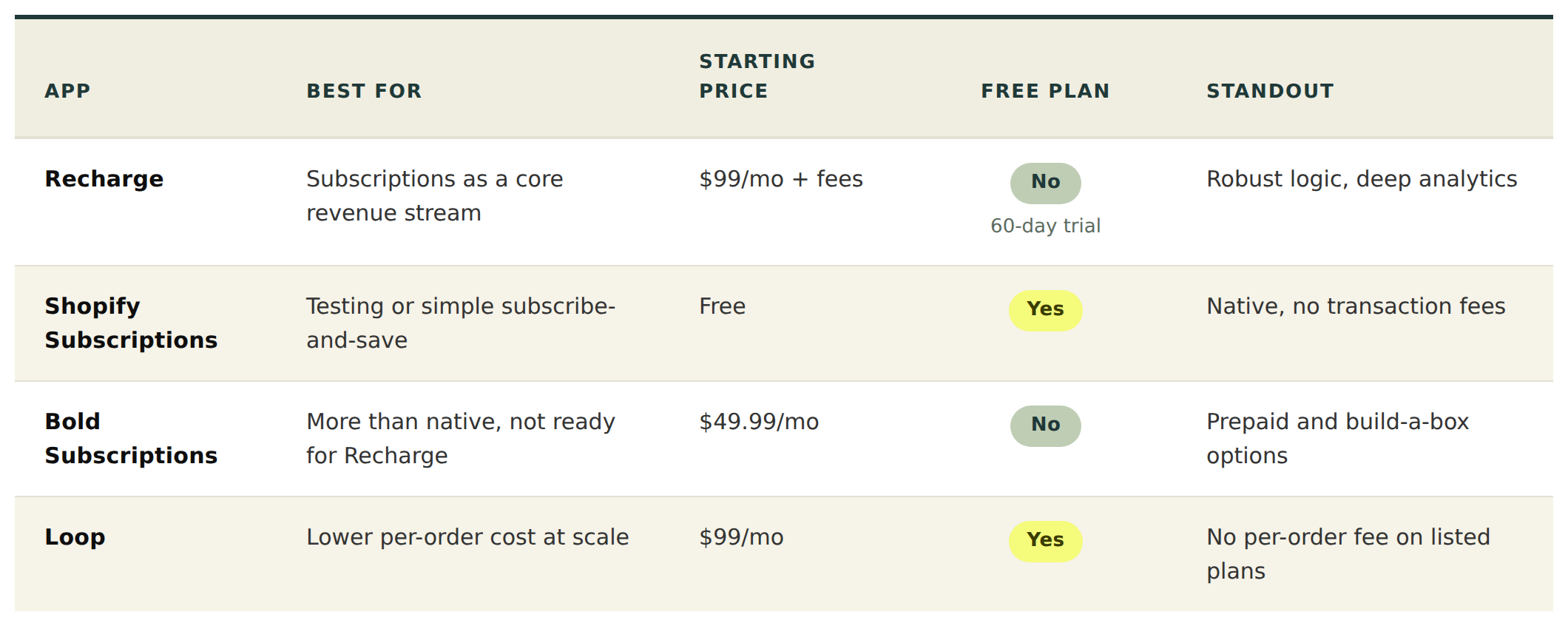
Recharge (Starter $99/month plus 1.49% + 19¢ per transaction; Plus $499/month plus 1.34% + 19¢; a $25/month entry tier exists for net-new merchants with under 50 subscribers) is the leading subscription platform on Shopify, powering recurring revenue for thousands of brands. It's extremely robust, with an excellent customer portal, deep analytics and the ability to handle complex logic like build-a-box, prepaid and gift subscriptions. The thing to keep front of mind is the cost structure: the transaction fees sit on top of the monthly fee, and at real subscription volume the percentage dwarfs the base price, so the true cost is well above the headline. It's also more than you need for simple subscribe-and-save. For brands where subscriptions are core, it's still the category standard.
Shopify Subscriptions (free) is the native option, a basic subscription system built into the platform with no transaction fees and nothing extra to manage. Features and analytics are limited next to Recharge and customisation is thin, but for a brand testing subscriptions or running a simple subscribe-and-save model, the price and the native integration are hard to argue with. Start here and graduate when you hit its ceiling.
Bold Subscriptions (from $49.99/month) offers flexible management with prepaid, gift and build-a-box options at a lower price than Recharge, with good customisation. The interface isn't as polished and some users report occasional bugs, but for a growing brand that needs more than Shopify Subscriptions and isn't ready for Recharge's pricing, it fills the gap.
Loop (free plan, Starter $99/month plus 1.0%, Pro $399/month plus 0.75%) is the challenger worth knowing about, and the reason it's here is cost: its listed plans carry no per-order fee, where Recharge and others charge per subscription order on top of the percentage. At high order volumes that difference compounds into a materially lower bill. It's newer than Recharge and the ecosystem around it is younger, but if subscriptions are a major line and per-order fees are eating into margin, it belongs on the shortlist.
7: CRO and Personalisation
Personalisation tools work best when they're connected to customer data, reviews and email. The strongest setups feed recommendations off subscription behaviour, review data and purchase history rather than guessing, which is why the personalisation engine you choose should integrate with the rest of your stack rather than operate in isolation. Worth saying plainly though: an app is a tool, not a strategy. The returns come from knowing what to fix and why, which is the subject of our guide to what conversion rate optimisation actually involves.
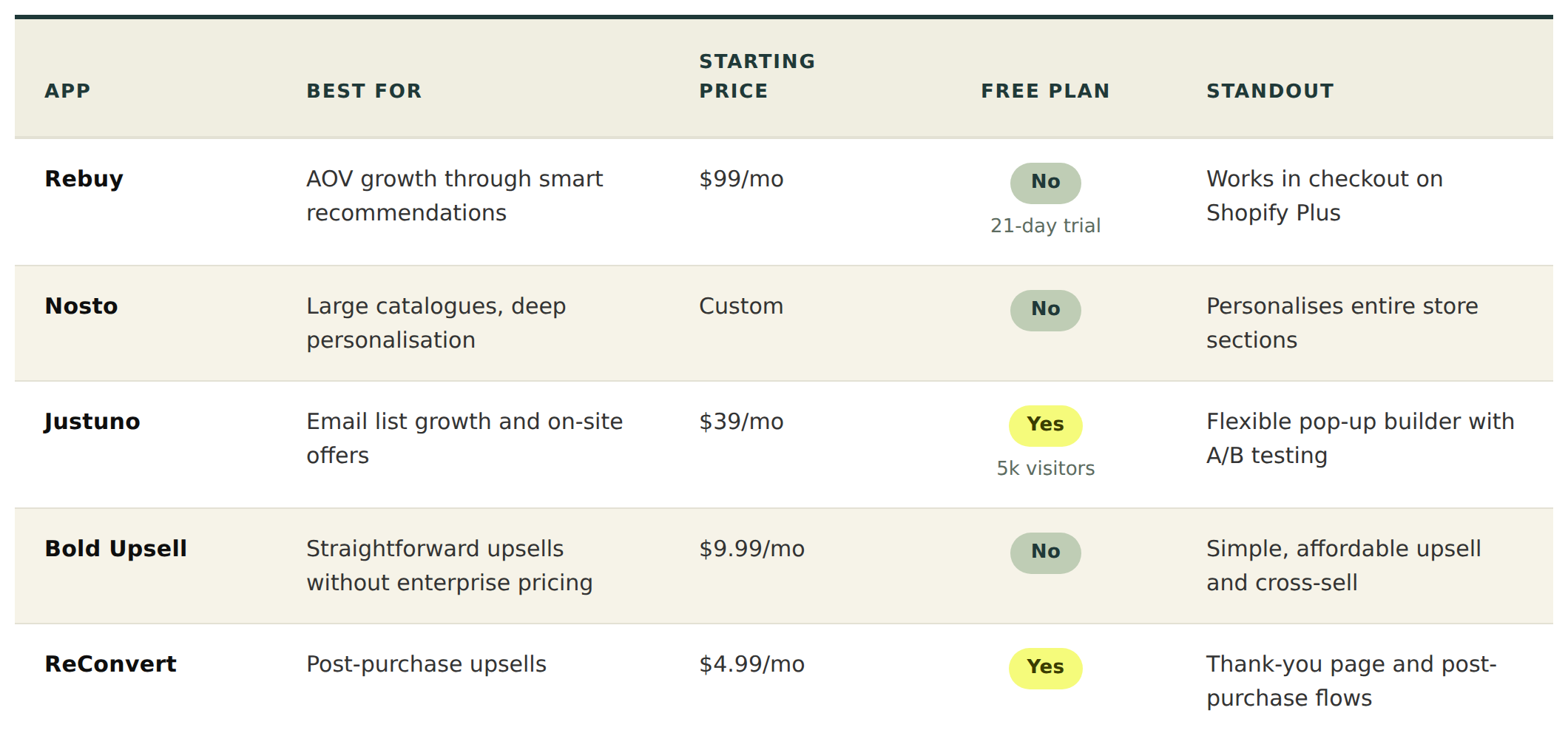
Rebuy (from $99/month, scaling with orders; a Platform One bundle runs around $534/month) is an AI-powered personalisation engine that lifts average order value through smart recommendations, upsells, cross-sells, bundles and post-purchase offers across product pages, cart, checkout and the customer journey. The recommendations are genuinely smart, it works in the checkout on Shopify Plus, and the impact is easy to measure. It can be expensive for smaller stores and the revenue-based pricing escalates, so it earns its place on established stores with the volume to justify it.
Nosto (custom pricing, based on revenue) is a personalisation platform that goes beyond product recommendations to personalise entire sections of the store, and it's strong on larger catalogues. Implementation can be complex and it needs significant traffic to be effective, plus the enterprise pricing puts it out of reach for smaller stores, so it suits larger brands with extensive catalogues and real personalisation ambitions.
Justuno (free to 5,000 monthly visitors, paid from $39/month) is an on-site conversion tool focused on pop-ups, banners, lead capture and exit-intent offers, with a flexible builder, good targeting and built-in A/B testing. Pop-ups hurt the experience if overused and can affect performance if configured carelessly, so it's best for brands focused on email and SMS list growth that will use it with restraint.
Bold Upsell (from $9.99/month) handles product upsells and cross-sells through pop-ups and in-page widgets. It's affordable, simple to set up and effective for the basics. It's less sophisticated than Rebuy's AI-driven approach and the personalisation is limited, which makes it the right call for smaller brands that want straightforward upsell functionality without enterprise pricing.
ReConvert (free plan, paid from $4.99/month) specialises in the post-purchase moment, building thank-you page and one-click post-purchase upsell flows that capture extra revenue after the sale is already made. It's cheap, popular with smaller and mid-size stores, and a sensible first step into upselling before you graduate to a full personalisation engine like Rebuy.
8: Analytics and Reporting
Analytics tools get far more useful when they centralise data from your whole stack rather than reporting on one channel. The profit and attribution platforms below pull from Shopify, your ad accounts, your email tool and your subscription platform to give a single picture of profitability and lifetime value. Good analytics connects every touchpoint in the customer journey; siloed analytics just adds another dashboard.
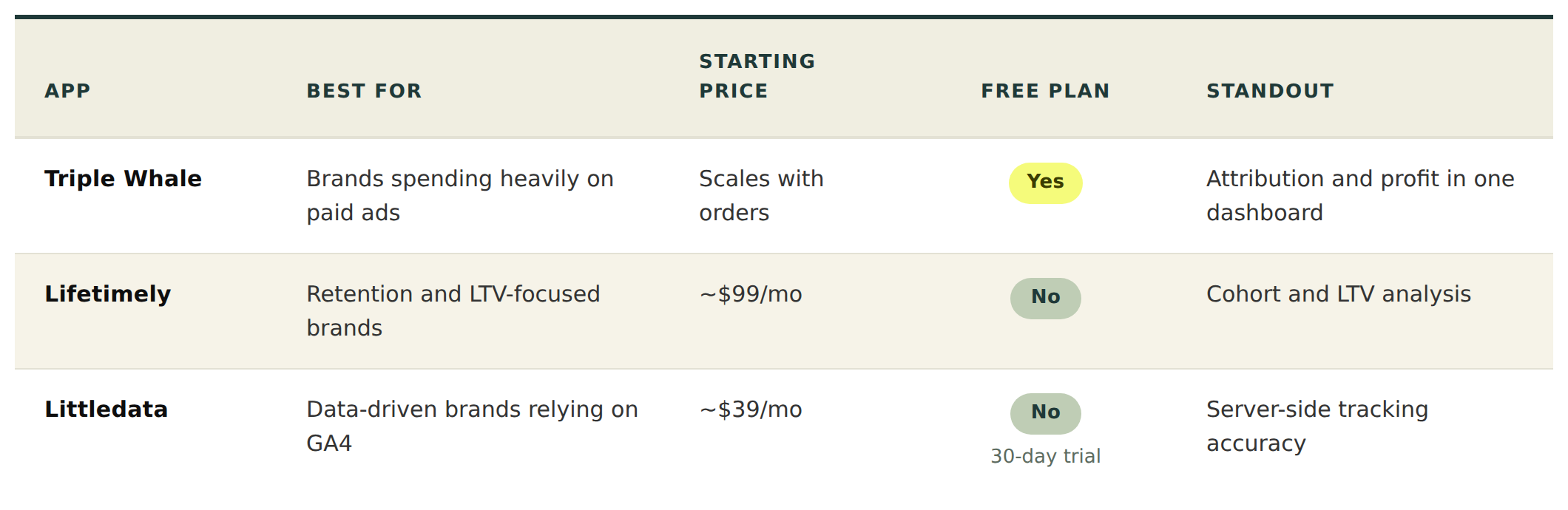
Triple Whale (free plan now available, paid scales with order volume) is an ecommerce intelligence platform that pulls marketing, sales and profit into one dashboard, connecting Shopify, ad platforms and your email and SMS tools for a single source of truth. The attribution modelling is excellent, the profit calculations are clear, and the mobile app is handy for checking performance on the move. Attribution is only ever as good as the data feeding it, there's a learning curve, and the paid tiers get expensive, so it's aimed at brands spending significantly on paid advertising who need accurate attribution to manage that spend.
Lifetimely (from around $99/month, no free tier; now part of Littledata) focuses on customer lifetime value, cohort analysis and profit tracking, helping you understand what customers are worth over time rather than just at first purchase, broken down by acquisition channel, product and segment. The LTV analysis is exceptional and the profit tracking is clear and actionable. Its focus is narrower than Triple Whale's, so it's best used alongside broader analytics, and it's a particularly strong fit for subscription brands and anyone focused on retention.
Littledata (from around $39/month at low order volume, scaling up) fixes the common accuracy problems with GA4 and marketing attribution by implementing server-side tracking. It solves real problems quickly and the data-quality improvement is meaningful. It's a relatively expensive fix for what is essentially a tracking issue, and whether you need it takes some technical judgement, so it suits data-driven brands that rely on GA4 for decisions and need the ecommerce data to be accurate.
9: Loyalty and Rewards
Loyalty platforms are most effective inside your email and review strategy, not bolted on beside it. The strongest setups trigger loyalty reminders, VIP campaigns, referral nudges and points-expiry flows automatically through your email tool, and pairing loyalty with reviews from the same vendor creates a tighter retention loop than running each in isolation.
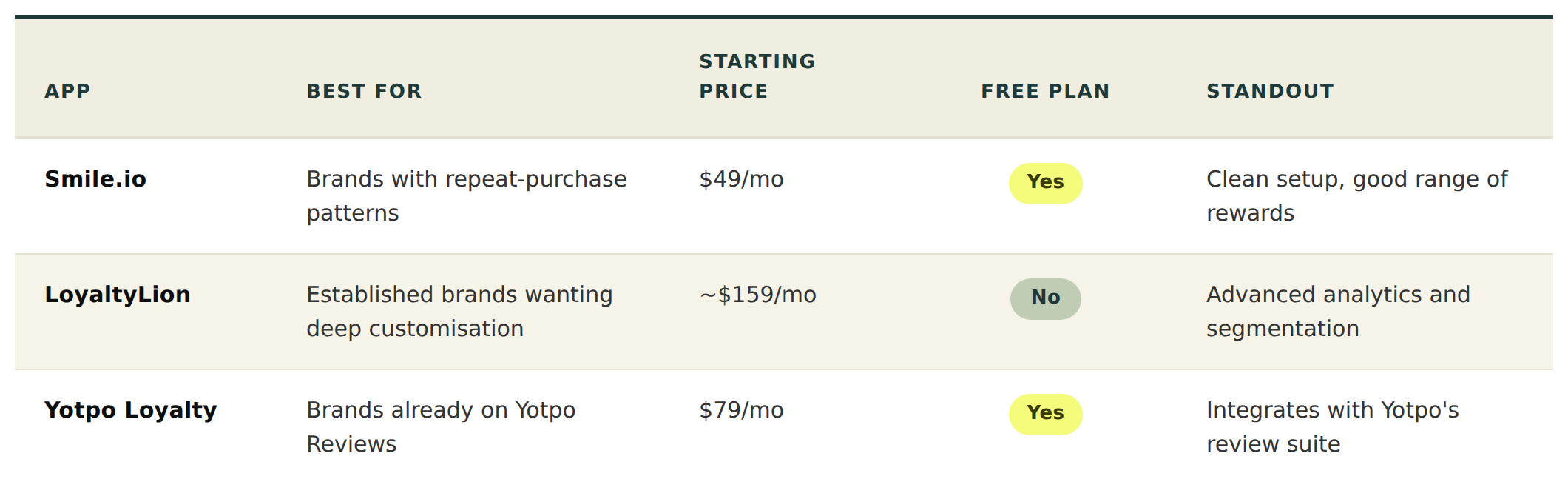
Smile.io (free plan, Starter $49/month, Growth $199, Pro $599) helps brands lift repeat purchases through points, VIP tiers and referrals, and it's built to be easy: quick to set up, with a clean customer-facing interface and a good range of reward options. Customisation is limited on the lower plans, and points-based loyalty isn't right for every brand, but for a store with genuine repeat-purchase patterns that wants to reward it, Smile is a straightforward, reliable choice and the free plan is actually functional.
LoyaltyLion (from around $159/month, scaling to $399, $729 and $1,650+ at higher order volumes) is the more customisable platform, with better analytics and segmentation than Smile and strong integration with email tools. It's expensive and overkill for smaller stores, with a steeper setup that may need onboarding help, so it earns its place with established brands that treat loyalty as core infrastructure and want a highly customised programme.
Yotpo Loyalty (free plan, premium from $79/month) is a loyalty and referral programme that integrates with Yotpo's reviews platform, and that's its whole argument: run it alongside Yotpo Reviews and you get a combined reviews-and-loyalty setup that cuts your app count. As a standalone, its loyalty features are comparable to competitors rather than ahead of them, so it makes most sense for brands already committed to Yotpo's review product.
10: Customer Support
Support platforms have quietly become revenue tools, not just service tools. The ecommerce-focused ones surface order history, subscription status, loyalty standing and customer value right in the agent's view, which makes support faster and opens the door to upsells and retention offers in the same conversation. For brands with high repeat-purchase behaviour, connected support directly influences lifetime value.
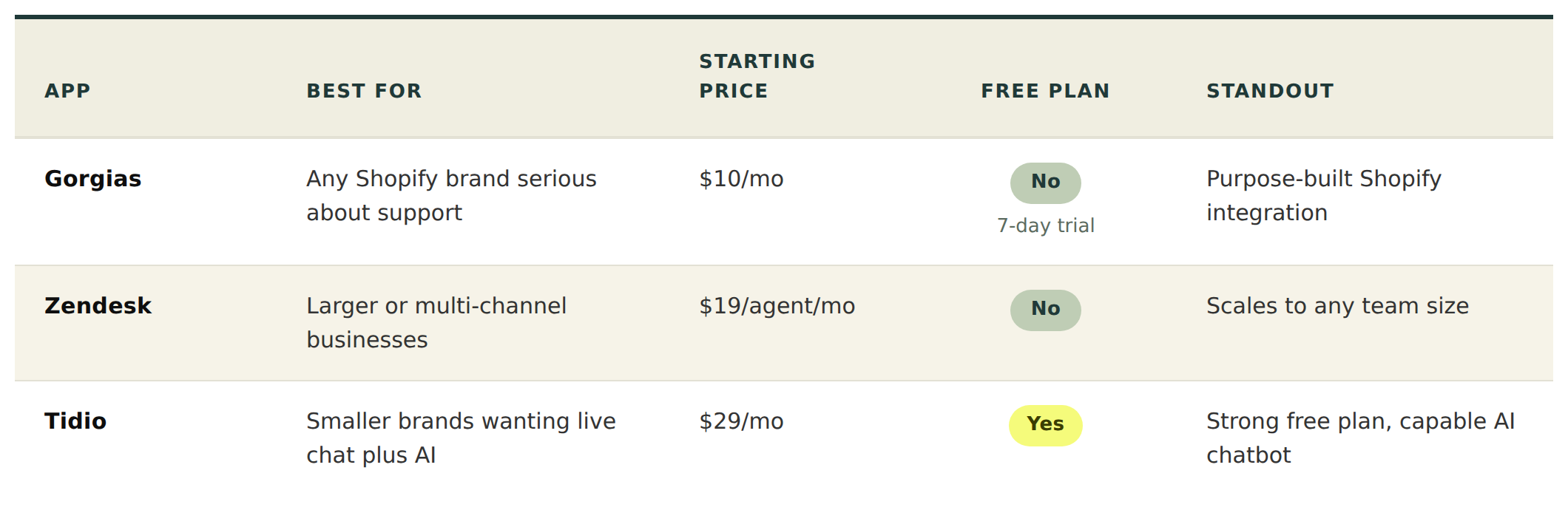
Gorgias (Starter $10/month for 50 tickets, Basic $60 for 300, Pro $360 for 2,000, Advanced $900 for 5,000; AI Agent resolutions billed separately at roughly $0.90–$1.00 each) is the ecommerce-focused helpdesk, built specifically for Shopify and centralising email, chat, social and phone in one inbox. The Shopify integration is excellent, the automation rules cut manual work, and the revenue tracking shows support's impact on sales. Two things to watch: the ticket-based pricing climbs fast for high-volume support, and the AI resolutions are billed on top of the ticket, so automation-heavy stores should model the combined cost rather than the headline. For most brands, Basic at $60 is the realistic starting point, and the Shopify integration alone justifies it.
Zendesk (from $19/agent/month) is the enterprise-grade option: a full ticketing system with live chat, knowledge base, email, social and phone in one workspace, extremely robust and scaling to any team size with a vast integration ecosystem. It isn't ecommerce-specific and can be complex to configure, so it suits larger brands or those with support needs beyond ecommerce, like multi-channel businesses where the breadth matters more than Shopify-native depth.
Tidio (free plan, paid from $29/month) combines live chat, chatbots and a basic helpdesk, with a good free plan, a capable AI chatbot and an easy setup. It's less powerful than Gorgias for ecommerce-specific workflows and the chatbot quality depends on how well you train it, which makes it a good fit for smaller brands that want live chat and basic automation without enterprise pricing.
11: Inventory and Fulfilment
Inventory and fulfilment apps become more powerful connected to your operational and marketing tools. Shipping platforms that integrate with your support tool and analytics improve fulfilment visibility and automate shipping workflows, and connecting fulfilment data to your email platform lets you trigger shipping updates and back-in-stock alerts automatically. Tight operational integration cuts manual work and smooths the customer experience.
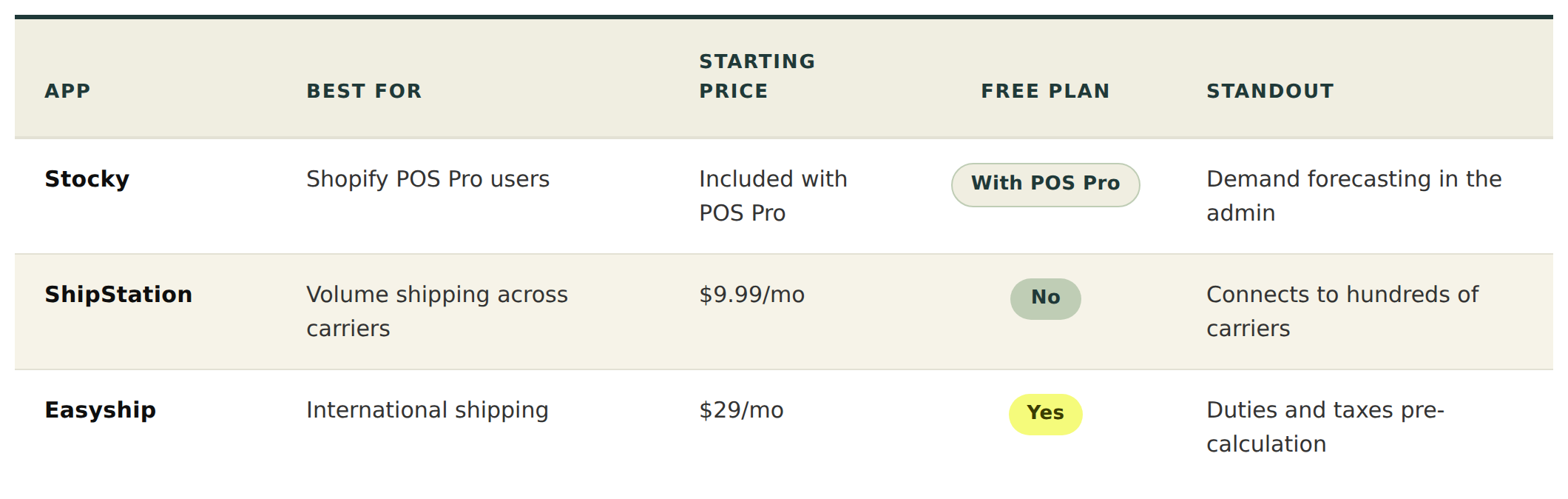
Stocky (included with Shopify POS Pro) is Shopify's inventory tool for POS Pro users, built to manage stock, purchasing and forecasting inside the admin. The native integration is the draw, and the demand forecasting helps prevent stockouts, with purchase order management included. It's only available through POS Pro and is limited next to dedicated inventory systems, so it's the right call specifically for brands on Shopify POS that need better inventory visibility.
ShipStation (from $9.99/month) is a multi-carrier shipping platform that compares rates, prints labels and manages orders across carriers and sales channels in one place, connecting to hundreds of carriers with reliable automation rules. The interface feels a little dated and the initial configuration takes some work, but for brands shipping real volume through multiple carriers it's a well-established, dependable choice.
Easyship (free plan, paid from $29/month) handles rate comparison, label generation and international shipping including duties and taxes calculation, and the international support is where it stands out: pre-calculating duties and taxes reduces the nasty surprises that cost you the sale at delivery. Some carriers and features sit behind higher plans, so it's best suited to brands with significant international shipping needs.
12: Speed and Performance
Performance is a whole-stack problem, not something a single app solves. The speed apps below help, but their effectiveness depends heavily on how many other apps are injecting scripts into your store. Analytics tools, review widgets, pop-ups and personalisation apps all carry a performance cost if poorly configured. The fastest Shopify stores combine lightweight apps, strong development practice and careful integration management, rather than leaning on one "speed app" to undo the damage of everything else. For the detail on what actually moves the numbers, our guide to improving Core Web Vitals on Shopify is the place to start.
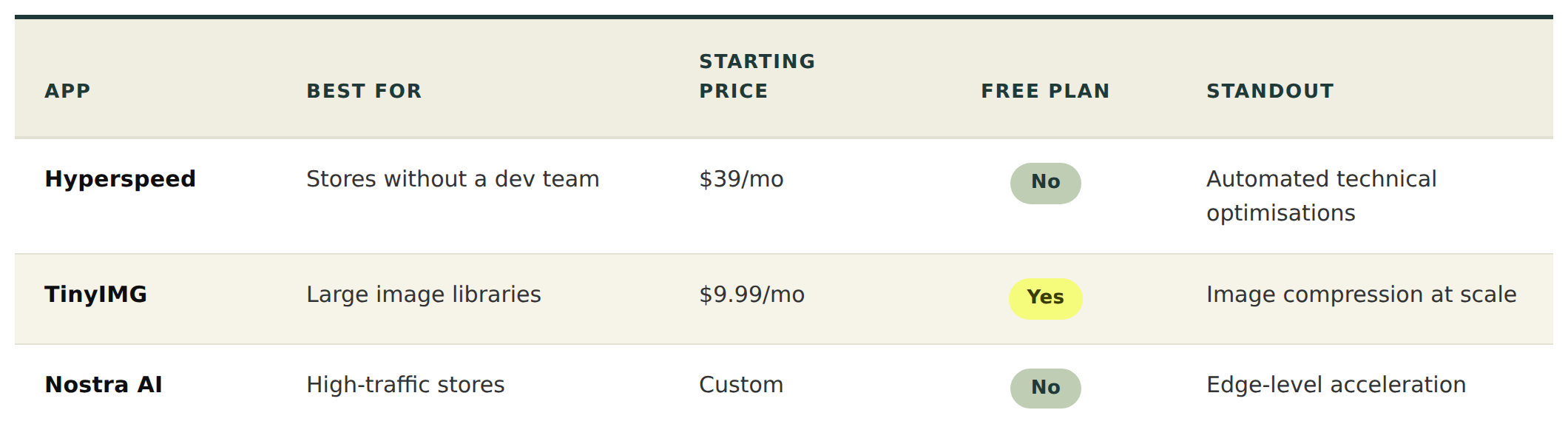
Hyperspeed (from $39/month) optimises load speed through lazy loading, image optimisation and code minification, with measurable improvements, an easy install and the technical work handled automatically. Results vary by theme and existing stack, and some of what it does a good developer could do by hand, so it's most useful for stores with speed issues that don't have development resource.
TinyIMG (free plan, paid from $9.99/month) earns a second mention here for image compression specifically, reducing file sizes without visible quality loss at scale, with auto alt text and broken-link detection alongside. Image compression is only one part of speed and it won't fix problems caused by heavy apps or poor code, but for stores with large image libraries it handles the compression piece well.
Nostra AI (custom pricing) is an edge-intelligence and site-acceleration platform that works at the infrastructure level, serving and optimising content at the network edge rather than just compressing assets. It can deliver significant speed improvements, especially for global audiences and high-traffic stores. The premium pricing isn't accessible to everyone and it takes technical evaluation, so it's aimed at high-traffic stores where speed is a genuine competitive priority.
13: Returns and Post-Purchase
This is another category most lists skip, and one that brands in this revenue band always end up needing. Returns are a real cost and a real retention moment: handled badly they bleed margin and goodwill, handled well they keep the customer and recover revenue through exchanges rather than refunds. A dedicated returns platform automates the process, sets your policy rules and pushes for exchanges and store credit over cash refunds.
Loop Returns and Rebound are the two names worth knowing here. Both manage the returns flow end to end, automate approvals against your rules, and steer customers towards exchanges and store credit. For a store doing meaningful volume, the recovered revenue and the time saved on manual returns handling tend to justify the cost quickly. If returns are currently a manual, email-driven process, this is a category worth looking at before it scales into a problem.
14: Apps to Avoid: Common Mistakes
Don't install apps you won't actively use. Every app adds code even when idle, so audit your stack quarterly and remove anything dormant.
Don't duplicate Shopify's native features. Shopify now covers basic email, reviews, subscriptions and more natively. Check the native option before adding a third-party app.
Be wary of competing pop-ups and overlays. Multiple pop-up apps fighting for attention make for a poor experience. One well-configured tool beats three competing ones.
Watch for apps that inject heavy scripts. Test store speed before and after installing anything. If an app adds more than 100ms to load time, question whether the value justifies the cost.
15: How Many Apps Should Your Store Have?
There's no magic number, but as a rough guide: starter stores under £100K in revenue tend to run 5 to 10 apps; growing stores between £100K and £1M run 10 to 20; established stores above £1M run 15 to 25. For enterprise stores, fewer is often better, replacing apps with custom solutions where it makes sense. The aim isn't a target count, it's keeping the stack lean enough that it doesn't slow the site or drain the budget.
16: When to Go Custom
If an app doesn't fully meet your requirements, whether that's design flexibility, checkout behaviour or deeper integration, a custom-built alternative is worth considering. The tipping point usually arrives when a brand is working around the limitations of several apps at once, paying for all of them, and still not getting the behaviour it needs. A concrete example: a store on Shopify Plus that wants specific logic in the checkout, something the standard subscription or upsell apps can't reach, often finds a bespoke checkout extension does the job more cleanly than three apps half-covering it. Past a certain scale, a custom solution becomes more efficient and better aligned with how the business actually works. Our development team builds custom Shopify integrations and components designed to bridge exactly these gaps.
17: Frequently Asked Questions
How do I know if an app is slowing down my store?
Test your store speed with Google PageSpeed Insights or GTmetrix before and after installing. You can also use your browser's developer tools, in the Network tab, to see which scripts each app loads and how much time they add.
Are free Shopify apps safe to use?
Most are legitimate, but check the reviews, verify the developer's reputation, and understand how the app makes money, whether that's advertising, data collection or upselling to paid plans. If a free app seems too good to be true, look closer.
Can too many apps break my Shopify store?
Yes. App conflicts are a common source of bugs. Apps that modify the same parts of your theme can create JavaScript errors, display issues and checkout problems, so keep the stack lean and test thoroughly after adding anything new.
Should I use Shopify's native apps or third-party alternatives?
Start with the native options, Shopify Email, Shopify Subscriptions, Shopify Inbox, and move to third-party tools only when you need features the native ones don't offer. Native apps are generally lighter, more reliable and better integrated.
How often should I audit my Shopify apps?
At least quarterly. Remove anything you've stopped using, check for better alternatives, and test your store speed. An annual deep audit with a Shopify development partner is worthwhile for a growing store.
Do I need different apps for Shopify Plus?
Some apps offer Plus-specific features, particularly around checkout customisation, and some Plus features replace certain apps entirely. Shopify Flow, for instance, can replace many automation apps. If you're moving to Plus, review your stack to see what you still need.
What's the best Shopify app for increasing sales?
It depends where you're losing sales. If you lack reviews, Judge.me will likely have the biggest impact. If you're not doing email marketing, Klaviyo will. If your recommendations are weak, Rebuy will help. If shoppers can't find products, a search app will. Identify your biggest conversion bottleneck and work from there. If you'd rather not guess, our CRO service finds the bottleneck with data.
How much should I budget for Shopify apps monthly?
Most growing D2C brands spend between £200 and £800 a month on apps, with more established brands at £1,000 to £3,000+. It's worth evaluating each app's ROI individually rather than setting an arbitrary cap.
Need help choosing the right apps, or building custom solutions when off-the-shelf tools don't quite fit? Our Shopify development and app teams can help you design a lean, high-performing stack built around your store. Get in touch to streamline your setup and scale more efficiently.