




Every Shopify theme ships with some schema markup out of the box, mostly around products. Most merchants take that as the finished job and move on to something else.
It rarely is. Default markup varies wildly between themes, misses schema types that earn real visibility, and breaks in ways nobody notices until a rich result that used to show up stops appearing.
The Schema Types Worth Prioritising
Schema.org lists dozens of types. Only a handful earn their place on a Shopify store, and each does a specific job: telling Google who you are, what you sell, how your pages relate to each other, and what your content actually says.
Organisation schema
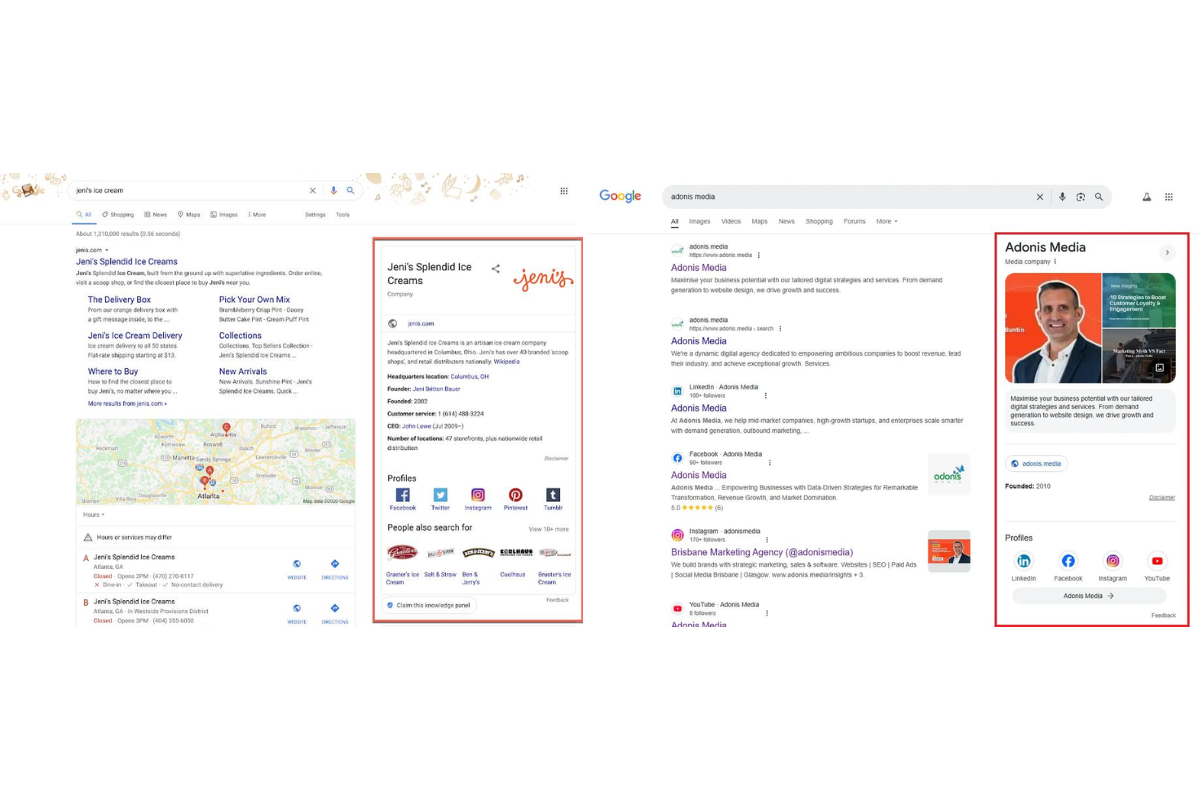
Organisation schema tells search engines who owns and runs the site. It sits on the homepage and covers the business name, logo, URL, contact details and social profiles, and it's what lets Google build a confident picture of your brand rather than piecing it together from the page content alone.
For an ecommerce brand, it's less about a direct ranking boost and more about trust. A confirmed logo and consistent brand details reinforce the entity Google already holds for you, and they support every other schema type on the site, particularly Product and Article markup, which both reference the same organisation behind them.
{
  "@context": "https://schema.org",
  "@type": "Organization",
  "name": "Example Store",
  "url": "https://www.examplestore.com",
  "logo": "https://www.examplestore.com/logo.png",
  "sameAs": [
    "https://www.instagram.com/examplestore",
    "https://www.linkedin.com/company/examplestore"
  ]
}
Product schema
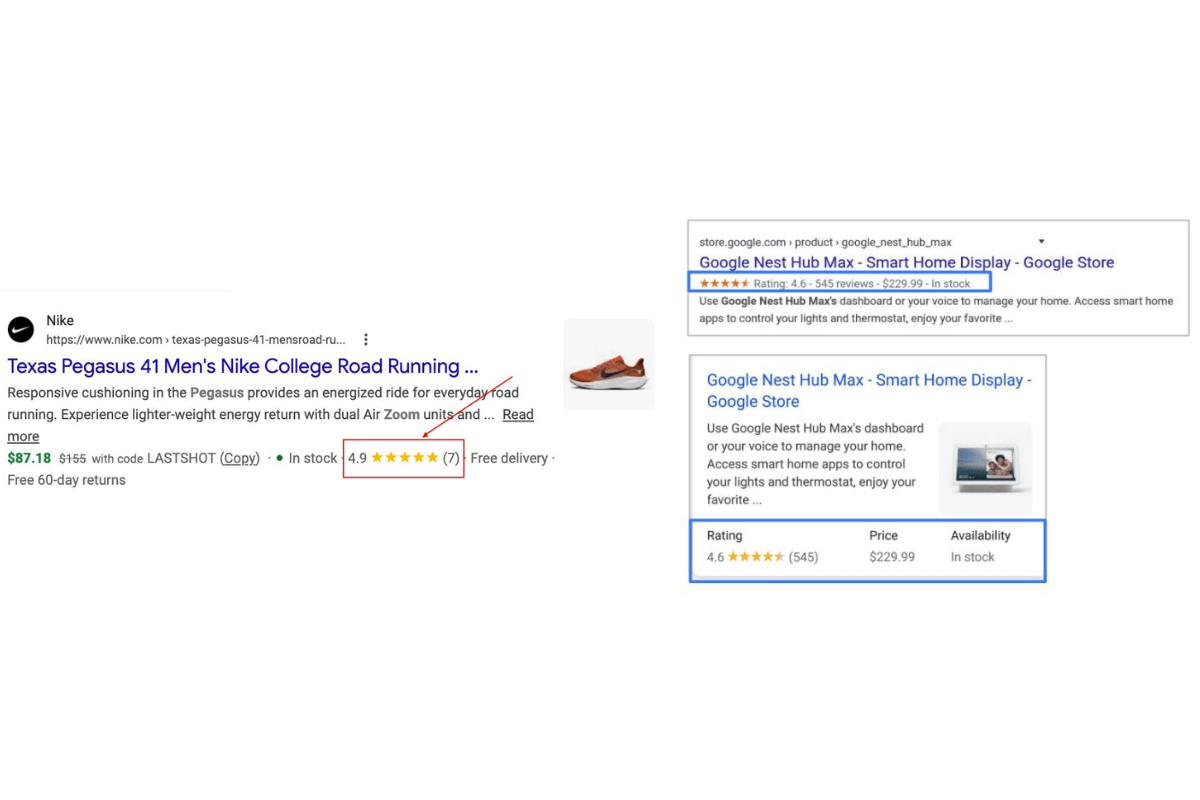
Product schema is the one that matters most on a Shopify store, and the one worth getting exactly right. It gives search engines the detail behind a listing: price, currency, availability, SKU, brand, images, and review data. Get it right and your products become eligible for the rich results that show a price and a star rating directly in the search listing, before anyone's clicked through. Eligibility isn't guaranteed even with perfect markup, but incomplete markup rules it out entirely. Miss a required property, price or availability especially, and the listing won't qualify regardless of how complete everything else is.
There's a newer reason to care. Google announced Universal Cart at I/O 2026: an AI shopping cart that works across Search and the Gemini app, built on a protocol Google co-developed with Shopify. The Buy button itself is gated by a Merchant Center feed attribute rather than by on-page schema, so adding Product markup to a page doesn't switch it on by itself. What it does is feed the same underlying signal Google, Merchant Center and AI Mode all draw from when deciding whether to trust and surface your product data. Clean, complete, current Product schema was already worth doing. It's now also the foundation a wider set of Google surfaces sit on top of.
We've mapped the wider AI search picture, Merchant Center, AI Mode and Universal Cart included, in a guide to optimising a Shopify store for AI search. Product schema is the foundation most of it depends on.
{
  "@context": "https://schema.org",
  "@type": "Product",
  "name": "Organic Green Tea",
  "image": "https://www.examplestore.com/images/green-tea.jpg",
  "brand": {
    "@type": "Brand",
    "name": "Example Store"
  },
  "offers": {
    "@type": "Offer",
    "price": "19.99",
    "priceCurrency": "GBP",
    "availability": "https://schema.org/InStock"
  }
}
Breadcrumb schema
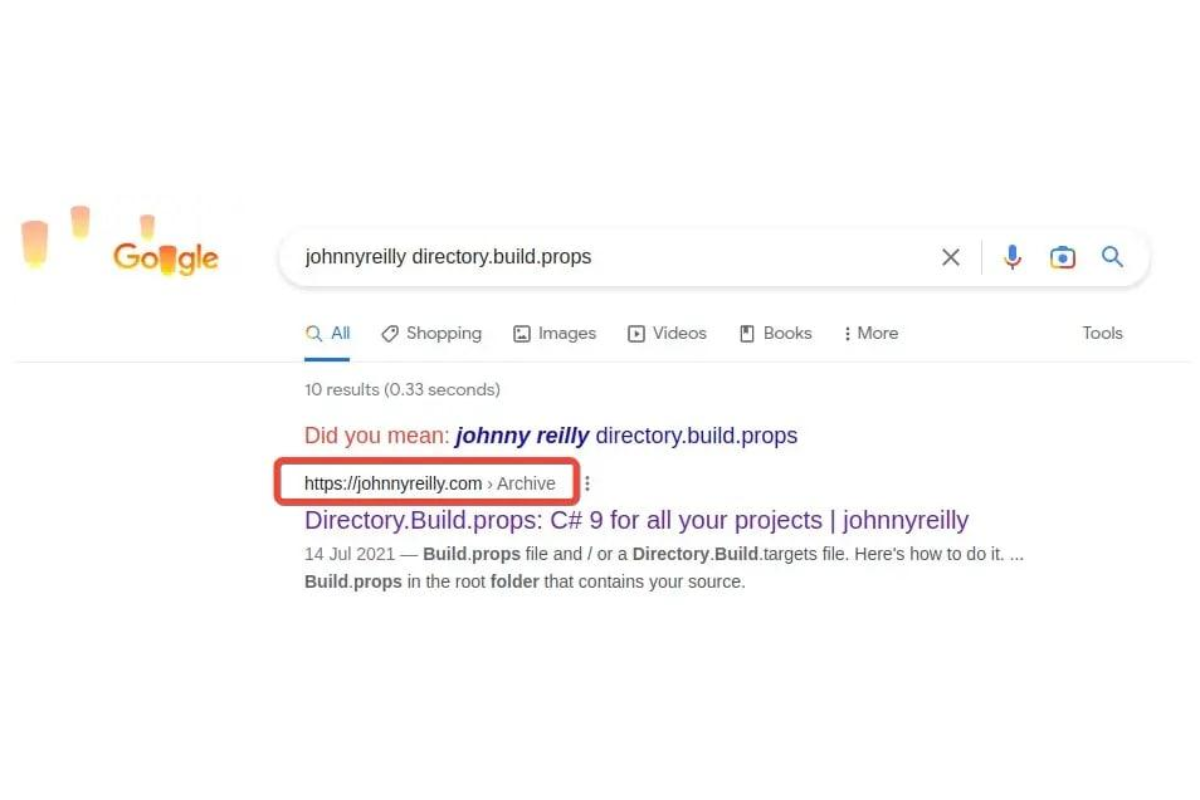
Breadcrumb schema tells search engines how a page sits inside your site's structure. Instead of displaying a raw URL under the listing, Google can show the path instead: Home > Women's Clothing > Dresses > Maxi Dresses. For a Shopify store with a large catalogue and several collection levels, that trail gives shoppers an immediate sense of where they've landed and gives Google a clearer read on how your pages relate to each other, which helps with both crawling and categorisation.
FAQ schema
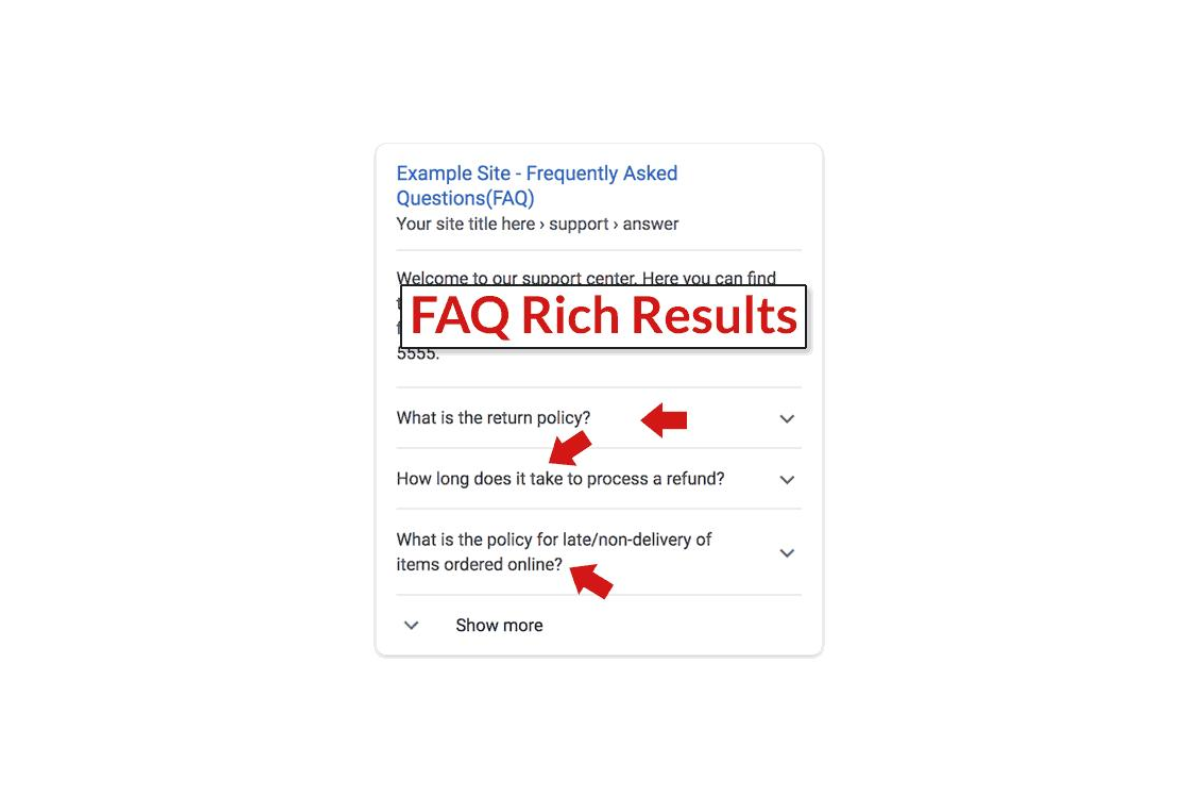
FAQ schema is where this guide needs to correct something that was true a year ago and isn't anymore. Google fully retired FAQ rich results on 7 May 2026. The expandable question dropdowns that used to appear directly under a search listing are gone, for every site and every vertical, including the government and health sites that had kept limited eligibility since Google's first restriction back in 2023. Search Console's FAQ reporting follows in June, and API support ends in August.
FAQPage schema itself hasn't been deprecated. It's still a valid Schema.org type, Google still parses it, and it still has a job to do, though a different one than before. With the rich result gone, the value shifts from presentation to comprehension: clearly structured question-and-answer content is easier for Google's AI Overviews, and for tools like ChatGPT, Perplexity and Gemini, to extract and cite accurately. None of that is a reason to mark up questions that don't answer anything real. Google's guidance hasn't changed on this point: FAQ schema should only wrap questions and answers that are genuinely visible on the page and worth a visitor's time.
That shift from presentation to comprehension is part of a bigger pattern. We've made the case for why Shopify brands now need both SEO and GEO, and FAQ schema sits right where the two overlap.
{
  "@context": "https://schema.org",
  "@type": "FAQPage",
  "mainEntity": [
    {
      "@type": "Question",
      "name": "What is structured data?",
      "acceptedAnswer": {
        "@type": "Answer",
        "text": "Structured data helps engines understand page content."
      }
    }
  ]
}
Article schema
If a Shopify store runs a blog, article schema gives search engines the publication details behind each post: headline, author, publisher, featured image, and the dates it was published and last updated. That last part matters more than it sounds. Published and modified dates are one of the clearer freshness signals a page can send, and Google leans on freshness heavily for topics where the answer changes over time.
It's also the schema type that rewards a real content programme rather than punishing a thin one. A store publishing buying guides and educational content as part of its SEO strategy gets more out of Article schema than one posting occasional updates, because the freshness and authorship signals compound across more pages.
What Shopify Gives You by Default
Most current Shopify themes output some structured data automatically, particularly around products. How complete that markup is depends entirely on the theme, and it's common for a store to be missing schema types their theme never generates at all, Organisation and Breadcrumb in particular.
That makes "does my store have structured data" the wrong question to start with. The right one is which types, and how complete each one is. That answer should come before anything new gets added to the page, whether that's a developer building custom markup or a new app being installed.
Adding Structured Data to Your Shopify Store
There are three practical routes in, and the right one depends on technical resource and how much control the store needs.
The manual route: custom Liquid
Adding JSON-LD directly into theme templates through Liquid gives the most control. A developer can tailor the schema to each page type exactly, which usually produces the cleanest, most accurate markup a store can have. The cost is maintenance: every theme update is a chance for that custom code to break or get overwritten, and someone needs to be checking for it. This route tends to suit larger stores, or businesses that already have Shopify development support in place to own that maintenance.
Shopify schema apps
For merchants without development resource, a schema app will generate Product, Organisation, Breadcrumb and Article markup automatically, and it's a reasonable choice for most stores. The trade-off is control rather than effort: apps update themselves without anyone needing to touch code, but customisation is limited to whatever the app exposes, and the better tools charge an ongoing subscription for something a developer could otherwise build once. Check what your theme already outputs before installing one, since that's the most common way stores end up running duplicate schema without realising it.
Metafield-driven schema
Online Store 2.0 introduced metafields, which changed how schema can be managed at scale. Rather than hard-coding values, metafields let information like specifications, FAQs, materials and dimensions populate the schema automatically from the same data that drives the rest of the page. That keeps markup accurate as a catalogue grows and reduces the risk of schema drifting out of date while the product page itself gets updated. For a store running into the hundreds or thousands of SKUs, this is usually the most scalable of the three routes, and often the best long-term answer even where a developer built the initial implementation manually.
Testing Your Structured Data
Structured data is easy to get slightly wrong, and a small formatting error is enough to stop Google recognising it at all. Google's Rich Results Test is the fastest check: paste in a URL and it reports what it found, what's missing, and whether the page currently qualifies for a rich result. The Schema.org Validator does a related but different job. It checks compliance against the Schema.org spec itself rather than against Google's current rich result eligibility, which matters because a schema type can be perfectly valid and still not do anything for how a page appears in Google.
Neither tool replaces regularly checking Google Search Console, where the Enhancements reports surface structured data errors and warnings across the whole site rather than one page at a time. When something breaks, fix the markup, then either request a recrawl or wait for the next one. Search Console will confirm the fix once Google's re-crawled the page. Not every warning needs immediate action, but errors do.
It's worth testing alongside the other technical factors that affect visibility. Core Web Vitals is the other big one, and we've put together a walkthrough for improving Core Web Vitals on Shopify.
Where Structured Data Actually Breaks
Incomplete markup is the most common failure, and usually the simplest to fix. A product schema missing price or availability won't qualify for a rich result no matter how complete everything else is, so those fields are worth checking first whenever a listing isn't showing up the way it should.
Marking up content that isn't actually on the page is a different kind of mistake, and a riskier one. Google's guidelines are explicit that structured data has to reflect what a visitor can see: review stars for reviews that aren't displayed, or FAQ answers that don't appear anywhere on the page, cross the line from optimisation into misleading markup, and Google treats it accordingly.
Duplicate schema tends to creep in rather than get added deliberately. A theme outputs Product schema by default, a merchant installs an SEO app that outputs its own version, and now the page carries two competing sets of the same information. Search engines are left to guess which one to trust, which is a worse outcome than having no schema at all in that category. Shopify's product tags cause a related duplicate content problem, and it's common enough that we've written up the fix on its own.
Placement matters as much as content. JSON-LD needs to sit in the page's head section or be injected correctly through the right Liquid template, and a snippet dropped in the wrong place, or cut off partway through, will fail silently rather than throwing an obvious error.
Theme changes are the single biggest source of structured data going quietly wrong. A redesign, a migration, or even a routine theme update can overwrite custom code or strip schema out entirely, and most merchants only find out once a rich result they'd been getting stops appearing. Retesting after every major theme change is the only reliable way to catch this before it costs visibility.
The last failure mode is neglect rather than error. Prices change, stock levels change, contact details change, and schema that doesn't move with them starts telling search engines something that's no longer true. Running an initial test and never checking again is how stores end up with warnings that have been sitting in Search Console for months, unnoticed, limiting how the page can appear without anyone realising why.
Frequently Asked Questions
Does Shopify add structured data automatically?
Some. Most current themes output basic Product schema without any setup, but coverage varies a lot between themes, and Organisation, Breadcrumb and Article schema are commonly missing entirely. Check what's live with the Rich Results Test before assuming your theme has it covered.
Is FAQ schema still worth adding now the rich result is gone?
Yes, for the right reason. It won't earn the expandable dropdown in Google Search anymore. That closed in May 2026. But clearly structured question-and-answer content still helps AI Overviews and tools like ChatGPT and Perplexity extract and cite your answers accurately. Use it where you'd genuinely have an FAQ section anyway, not as a way to chase a rich result that no longer exists.
Why isn't my structured data showing up in Google?
Eligibility for a rich result was never guaranteed by valid markup alone. Google decides case by case. Start by ruling out the more common causes: a missing required property like price or availability, duplicate schema from a theme and an app both outputting the same type, or markup describing content that isn't visible on the page. Run the URL through the Rich Results Test to see exactly what Google is currently reading.
Do I need a developer to add structured data?
No, not for the basics. A schema app can get Product, Organisation, Breadcrumb and Article markup live without touching code, and that's enough for most stores. Where a developer earns their cost is bespoke page types, a metafield-driven setup that scales with a large catalogue, or diagnosing why something that should be working isn't.
How often should structured data be tested?
After every theme update or migration without exception, since that's when schema most commonly breaks, and as a routine quarterly check the rest of the time. Google Search Console's Enhancements reports will flag anything that breaks in the meantime.
Does structured data directly improve rankings?
Not on its own. It's not a ranking factor in the way page speed or backlinks are. What it does is make a page eligible for the search features, rich results, knowledge panels, and increasingly AI citations, that improve click-through and visibility once a page is already ranking. Treat it as unlocking a ceiling rather than raising a floor.
Getting Shopify Structured Data Right
Most of what breaks structured data isn't a knowledge gap, it's maintenance. Markup gets added once, tested once, and left alone through however many theme updates and app installs come next. The stores that keep their schema clean are the ones treating it as ongoing work, not a launch task they tick off once.
Structured data is part of how we handle Shopify SEO for every store we work with, from the first implementation through to catching what the next theme update breaks. If you want to know what's currently live on your store and what's missing, get in touch.