




Your payment setup affects three things that matter to the bottom line: card processing costs, checkout conversion and operational overhead. Get it wrong and the impact compounds with every order. This guide covers how Shopify Payments works, where it earns its place over third-party gateways, and how the main alternatives compare in 2026.
Pricing, fees, supported countries, available payment methods and other specifics vary by region, plan and merchant agreement.
What is Shopify Payments, and how does it work?
Shopify Payments is Shopify's native payment gateway and processor. Because it sits inside the platform, there's no separate integration, no second admin to log into, and no additional Shopify transaction fee on top of card processing costs.
Shopify Plan Pricing
Your plan dictates both the monthly subscription and the card processing rate you pay on every transaction. Headline pricing for 2026:
United States (USD, annual billing)
- Starter: $5 per month
- Basic: $29 per month, or $39 monthly
- Grow: $79 per month, or $105 monthly
- Advanced: $299 per month, or $399 monthly
- Plus: From $2,300 per month on a 3-year term, or $2,500 on a 1-year term
United Kingdom (GBP, annual billing)
- Starter: £5 per month
- Basic: £19 per month, or £25 monthly
- Grow: £49 per month, or £65 monthly
- Advanced: £259 per month, or £344 monthly
- Plus: From £1,800 per month on a 3-year term, or £1,950 on a 1-year term
Pricing in other regions follows the same tier structure in local currency. The Shopify pricing page for your market shows current rates, and our Shopify pricing guide breaks down the plans and fees in more detail.
Shopify Payments Card Processing Fees
With Shopify Payments, you pay a percentage plus a fixed fee per transaction. There's no additional Shopify transaction fee layered on top. Rates vary by region; two of the most common are shown here.
United States (online)
- Basic: 2.9% + 30¢ per transaction
- Grow: 2.7% + 30¢ per transaction
- Advanced: 2.5% + 30¢ per transaction
- Plus: Negotiated rates, typically the lowest available
United Kingdom (online)
- Basic: 2.0% + 25p per transaction
- Grow: 1.7% + 25p per transaction
- Advanced: 1.5% + 25p per transaction
- Plus: Negotiated rates, typically the lowest available
In-person POS rates are lower across all plans (for example, 2.6% + 10¢ on US Basic, or 1.7% + 0p on UK Basic). Rates for other regions follow the same descending structure as you move up plans and are published on Shopify's regional pricing pages.
Use a third-party gateway instead and Shopify charges an additional 0.5% to 2% on top of that provider's own fees, depending on your plan. Shopify Plus waives this entirely when Shopify Payments is the primary gateway. If a Plus store uses a third-party provider as its primary, a 0.2% security and compliance charge applies.
Country Availability
Shopify Payments is available in 40 countries as of 2026, up from 23 at the start of 2025 after various European markets were added (including Poland, Lithuania, Norway, Hungary, Greece, Cyprus and Bulgaria). The full current list is in the Shopify Help Centre.
Eligibility
Requirements vary by country but typically include:
- A business type that isn't on the prohibited list (worth checking before you assume you qualify)
- A bank account in a supported country, in the local currency, eligible for the relevant domestic transfer scheme
- Identity verification documentation (passport, driver's licence, residence permit and equivalent national IDs)
- Compliance with the Shopify Payments Terms of Service and Acceptable Use Policy for your region
Country-specific documentation requirements and supported bank account types are listed on each country's page in the Shopify Help Centre.
Regional Requirements
Availability of specific payment methods depends on the customer's location and currency, not the merchant's. UK shoppers can pay with major debit and credit cards. EU shoppers will see additional local methods such as iDEAL (Netherlands), Bancontact (Belgium), Sofort, Klarna and others where supported. US shoppers see Apple Pay, Google Pay, Shop Pay and ACH options for B2B.
Not all payment processors are available in every country. Shopify Payments bundles the most commonly used methods into a single gateway, which removes the need to source and manage multiple providers across regions. For brands scaling internationally, this is one of the more material operational simplifications on the platform.
Why Use Shopify Payments
Most merchants reach for Shopify Payments because it removes friction from a part of the business that, if fragmented, creates real overhead. The benefits below break down where that plays out.
Integrated Ecosystem vs. Third-Party Fragmented Solutions
Third-party gateways typically mean separate logins, separate reporting tools and separate support teams. When something breaks at the checkout, that fragmentation slows down diagnosis and pushes reconciliation work onto your finance team.
Shopify Payments keeps orders, payments, refunds and customer data in one admin. The operational saving is most visible in finance close, dispute handling and any month-end reconciliation work.
Shop Pay and Accelerated Checkout
Shop Pay is Shopify's native accelerated checkout. It stores shipping and billing information securely so returning customers complete purchases in one tap. In supported markets it also offers instalments.
For Shopify Payments merchants, Shop Pay is on by default. Other accelerated checkout providers usually need separate setup, and sometimes separate fees, to achieve the same effect.
Multi-currency and International Localisation
Shopify Payments handles currency conversion and local payment preferences across markets, removing the need for separate processors in each region. It also plugs into Shopify's localisation tools so region-specific pricing, languages and checkout experiences sit inside one system rather than a stack of regional builds.
Integrated Payouts and Simplified Reconciliation
Funds settle directly into your bank account on a regular schedule, visible inside the Shopify admin. Reporting is centralised, so sales, fees, refunds and payouts are tracked in one place rather than exported from multiple sources.
For finance teams, this is where the platform saves real time. Multi-gateway setups tend to produce reconciliation work that doesn't scale linearly with revenue, it scales worse.
The Plus Advantage
For higher-volume stores, Shopify Plus extends what Shopify Payments can do: more checkout customisation, more flexibility in how payment options are presented, and the ability to combine Shopify Payments with additional processors without losing centralised reporting. Our Shopify Plus vs Advanced comparison covers where the upgrade pays off.
Plus is also where the platform stops asking you to compromise on transaction volume. Shopify Payments is built to handle traffic spikes without reconfiguration, which matters during sale events and peak retail periods more than at any other time of the year.
Why Use Shopify Plus
Three commercial reasons:
Sell anywhere. Process payments across retail POS, social, the Shop channel and your storefront from one system.
Convert faster. Shopify's checkout converts 15% better on average than competing platforms (based on Shopify's 2023 study with a Big Three consultancy). Shop Pay's network now includes over 150 million global shoppers, and is the highest-converting accelerated checkout on the internet according to that same study.
Integrate everything. Payments, orders, fraud and inventory in one operational layer, with access to the broader Shopify ecosystem on top.
How Does Shopify Payments Work?
When a customer pays, Shopify Payments processes the transaction and deposits funds into your business bank account. It accepts major credit and debit cards (Visa, Mastercard, American Express, with regional additions such as Maestro, Discover, Diners Club, UnionPay, JCB and others), along with digital wallets (Apple Pay, Google Pay, Shop Pay) and a growing list of local methods.
The commercial result: no additional gateway fee, faster payouts than most third-party setups, and one processing system inside Shopify rather than a parallel one outside it.
Benefits Of Using Shopify Payments For Merchants
1. Simple and Integrated
One-click activation from the admin. All major cards and digital wallets are available immediately. No contract, so it can be switched on or off at any time.
The blended rate matters more than it might appear. Shopify Payments charges a single transparent fee per transaction. Some third-party providers advertise headline rates as low as 0.4% but layer in transaction charges, intra-regional premiums, admin fees and PCI compliance charges that push the effective rate much higher. Compare on effective cost, not headline rate.
You can still combine Shopify Payments with over 100 integrated third-party providers when there's a reason to: a specific instalment partner for high-AOV products, or a regional method that customers in a particular market expect.
2. Built to Convert
Shop Pay's network now exceeds 150 million global shoppers, with more than 200 million people having used it to complete purchases on Shopify-powered stores as of early 2025. Shopify's position is that guest checkout is in decline and identity-driven checkout is the future. The data supports this.
Shopify Payments vs Shop Pay
These are two different products and the distinction matters when you're comparing checkout setups.
Shopify Payments is the processor. It handles the transaction in the background; the customer enters their contact, shipping and billing details at checkout and doesn't see who's processing the payment.
Shop Pay is the consumer-facing wallet and accelerated checkout. It remembers customer details and applies them in one tap. It relies on Shopify Payments (or another supported processor) to actually move the money.
Studies show that even when shoppers don't use Shop Pay, its presence at checkout lifts conversion by 5%. When customers do use it, conversion is up to 50% higher than guest checkout.
What is 'Shop'?
Shop is Shopify's consumer-facing app, available on iOS and Android. Customers use it to track packages, discover stores and products, pay with Shop Pay and engage with brands directly. For merchants with significant mobile traffic, Shop is a free distribution channel. Customer accounts created in Shop carry through to your main store.
3. Flexibility and Control
Shopify Payments includes:
- Extended fraud control
- Vaulted cards for pre-orders, subscriptions and B2B
- Integrated POS payments
- Shop Pay, Google Pay and Shop integration
- Shopify Capital (available in select markets)
- Multicurrency price lists for B2B and D2C
Fraud protection is free for all merchants. Shopify Payments adds an additional layer on top.
Fraud Features: Free to All Merchants
- Machine learning algorithm trained on over 10 billion transactions
- Fraud risk scoring
- 3D Secure
- Fraud insights
- Flexible rules
- Allow and block lists
Fraud Features: Shopify Payments Exclusive
- In-checkout rules to filter and block fraudulent checkouts based on your own logic
- Card testing protection
- Advanced fraud insights
4. Go International
Shopify Markets enables international selling from a single store. Shopify Payments supports transactions in over 130 local currencies. North America remains Shopify's largest region by merchant count, with EMEA close behind and continuing to grow.
Combining Markets with Shopify Payments unlocks:
- Domain redirection
- Multi-currency from a single store
- Local payment methods such as Klarna, Bancontact and iDEAL, included by default
- Dynamic tax-inclusive pricing
- Automatic or manual conversion, rounding and price breakdown
Where Shopify Payments doesn't cover a market, you can plug in third-party providers like Stripe, Adyen, Worldpay or PayPal to build a more flexible international payments strategy.
5. Credible and Reliable
Shopify Payments is PCI DSS compliant with built-in encryption and 3D Secure authentication. 3D Secure is included; adding it via a third-party gateway typically costs extra per transaction. Across the platform, Shopify reports a 99.7% acceptance rate on orders, which sets a useful benchmark when assessing alternative providers. Keeping disputes low matters for both margin and processing health; our guide to preventing and managing chargebacks covers the practical steps.
6. Streamlined Checkout
Shopify's checkout is fast, mobile-first, and built around reducing cart abandonment. Shop Pay's one-tap option is the most material lever here for returning customers. Built-in fraud analysis flags suspicious transactions before they hit your order book.
For a broader look at how checkout fits into conversion strategy, see our conversion rate optimisation service.
7. Easy To Setup And Manage
No third-party accounts or separate logins. Payout timing varies by country, typically 2 to 5 business days from when a payment is captured (3 business days in the UK via Faster Payments, 2 in the US). No manual transfers from an external processor.
8. Security and Protection
Shopify is certified Level 1 PCI DSS compliant, which is the strictest tier of the standard. Every store on the platform is automatically PCI compliant as a result, which removes a category of regulatory overhead that merchants on other platforms have to manage themselves.
Comparing the Most Popular Shopify Payment Gateways in 2026
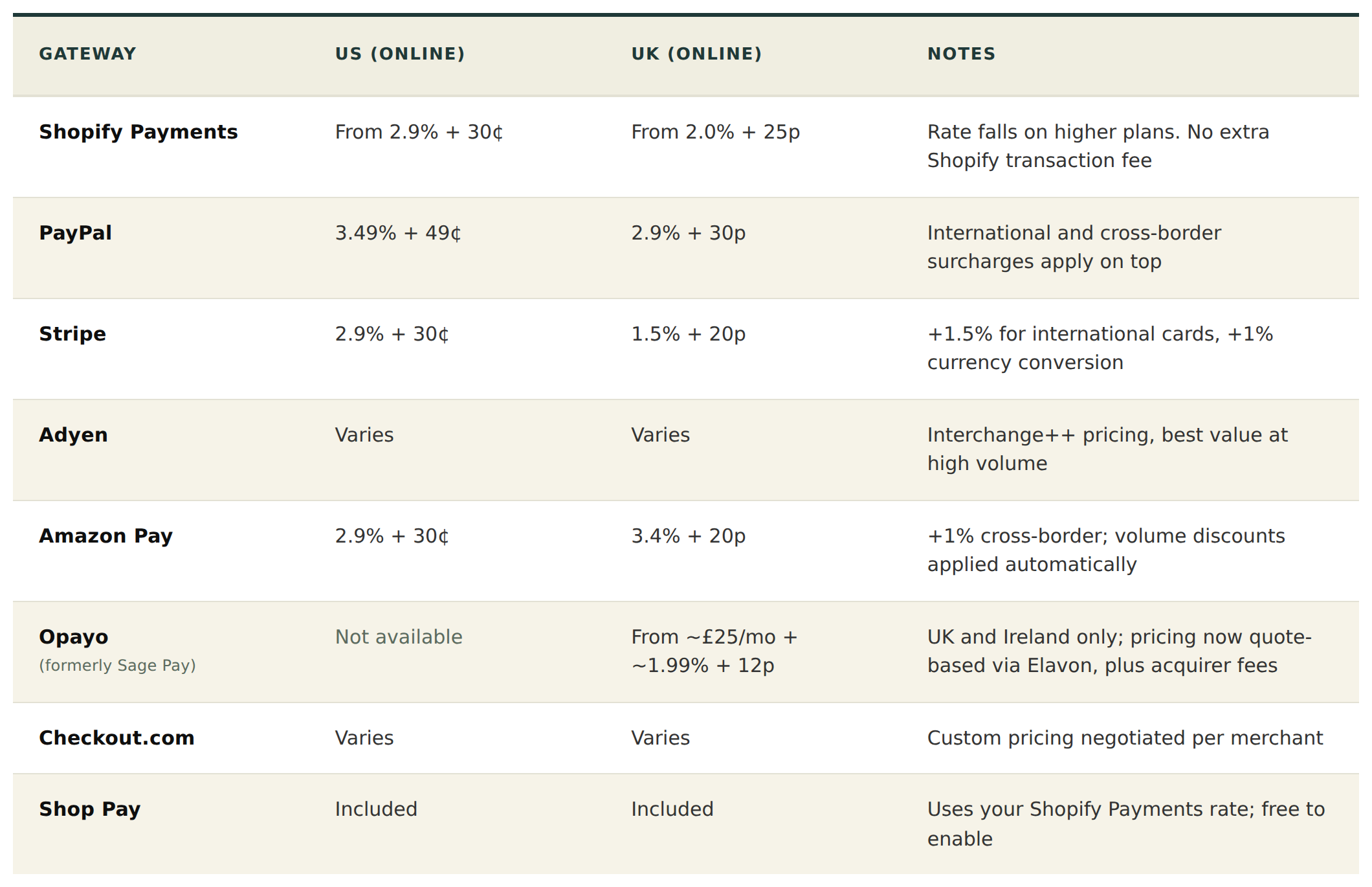
Fees first, as a quick reference. Rates below are for standard domestic online card transactions and were checked in June 2026; always confirm current pricing with the provider before making a decision, since rates change and high-volume merchants can often negotiate.
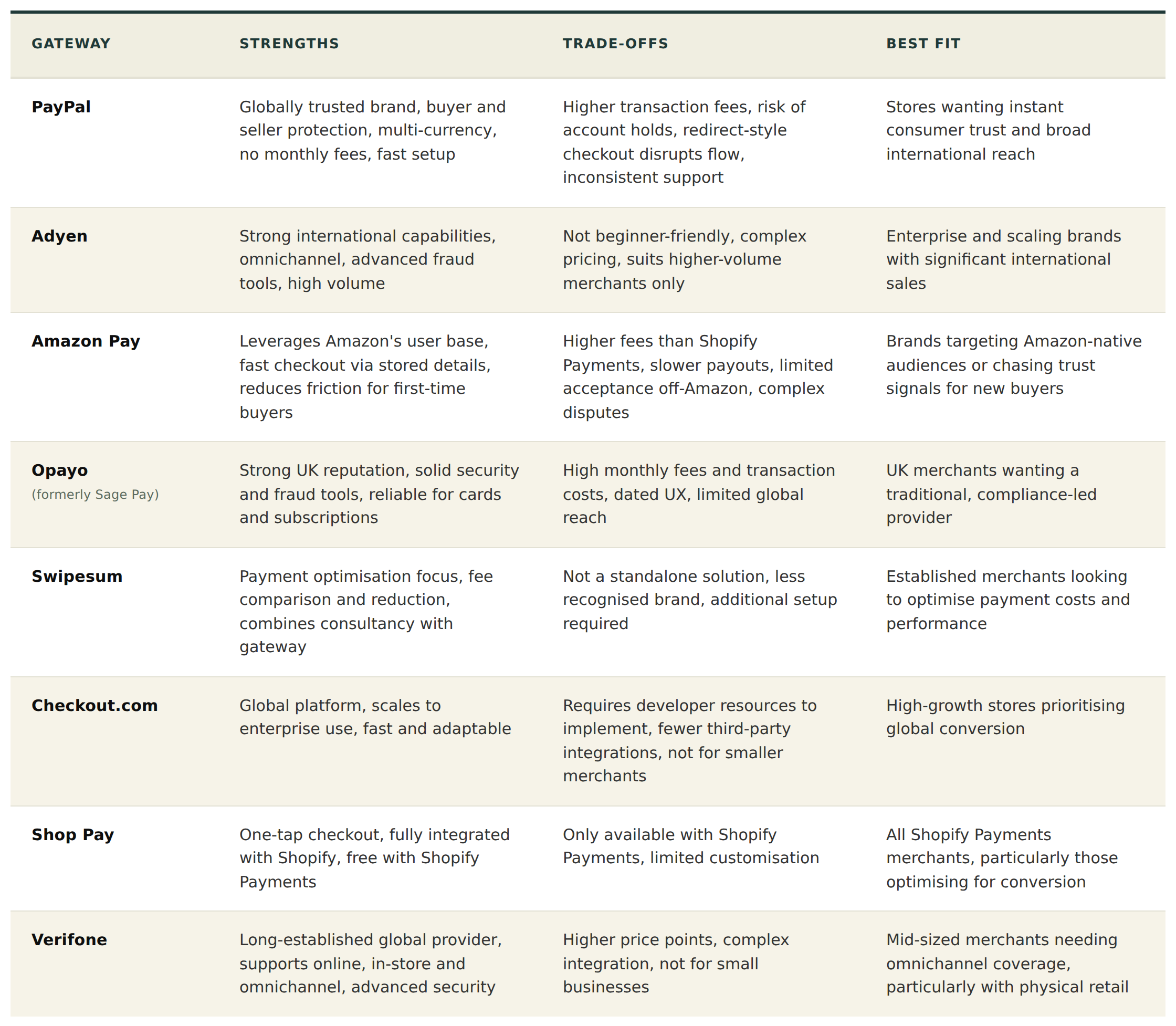
The table below goes a level deeper on where each provider fits.
How To Set Up Shopify Payments Gateway
1. Log into your Shopify admin
2. Go to Settings > Payments
3. Under Shopify Payments, click 'Activate Shopify Payments'
4. Enter your business details
5. Provide a bank account in the supported currency for your country
6. Verify your identity
7. Configure your payment methods
8. Set up your payout schedule
9. Click save
Conclusion
For high-volume stores, the case for Shopify Plus with Shopify Payments comes down to the same maths in any currency: lower per-transaction rates, waived third-party fees and the scalability to absorb peaks without re-architecting. The crossover point varies by region and average order value, but most brands processing the equivalent of $7m to $10m or more in annual revenue will see Plus pay for itself.
If you'd like a second opinion on what configuration makes sense for your store, get in touch with our team.